
Status: Work in progress. Items marked 🔄 are still in progress/code review.
Work Orders
Assignee field on work orders
What's new Work orders now include an Assignee field, making it easier to track who is responsible for each work order directly from the work order view and list.
Approve / Reject from the work order approval message
What's new Users can now approve or reject a work order directly from the approval message shown on the work order, without navigating to a separate approval screen.
Default minimum personnel set to 1
What's new When creating a new work order, the minimum personnel required now defaults to 1 instead of 0, reducing configuration errors for new work orders.
Updated column naming in work order list and exports
What's new Column names in the work order list and exported files have been updated for clarity and consistency.
🔄 Soft delete on work orders
What's new Deleting a work order will now move it to a Deleted Work Orders archive rather than permanently removing it. From the archive, work orders can be restored to the active list or permanently deleted.
- Deleted work orders are accessible in a new Deleted Work Orders page with search and pagination.
- Restore returns the work order to the active list with its original data. If any referenced items (such as assets or sites) have since been deleted, the restore still proceeds and a warning is shown describing what was removed.
- If a work order with the same ID already exists in the active list, restore is blocked with a clear error.
- Bulk restore supports up to 20 work orders at once.
- Permanent delete irreversibly removes the record and its attachments. This requires a dedicated permission and a confirmation step.
New permissions: readDeletedWorkorders, restoreDeletedWorkorder, permanentDeleteWorkorder.
Work Order Dashboard
Grouping, filters, and KPI improvements
What's new The work order dashboard has been updated with several improvements:
- A new toolbar control lets you switch column grouping between work order type and work order name (default).
- The period filter now defaults to the current year.
- A new asset type filter has been added.
- Per-asset-type icons are now displayed in the dashboard.
- The KPI bar has been simplified with a cleaner pending approval count and a new overdue work orders counter (highlighted in red).
Work Plans
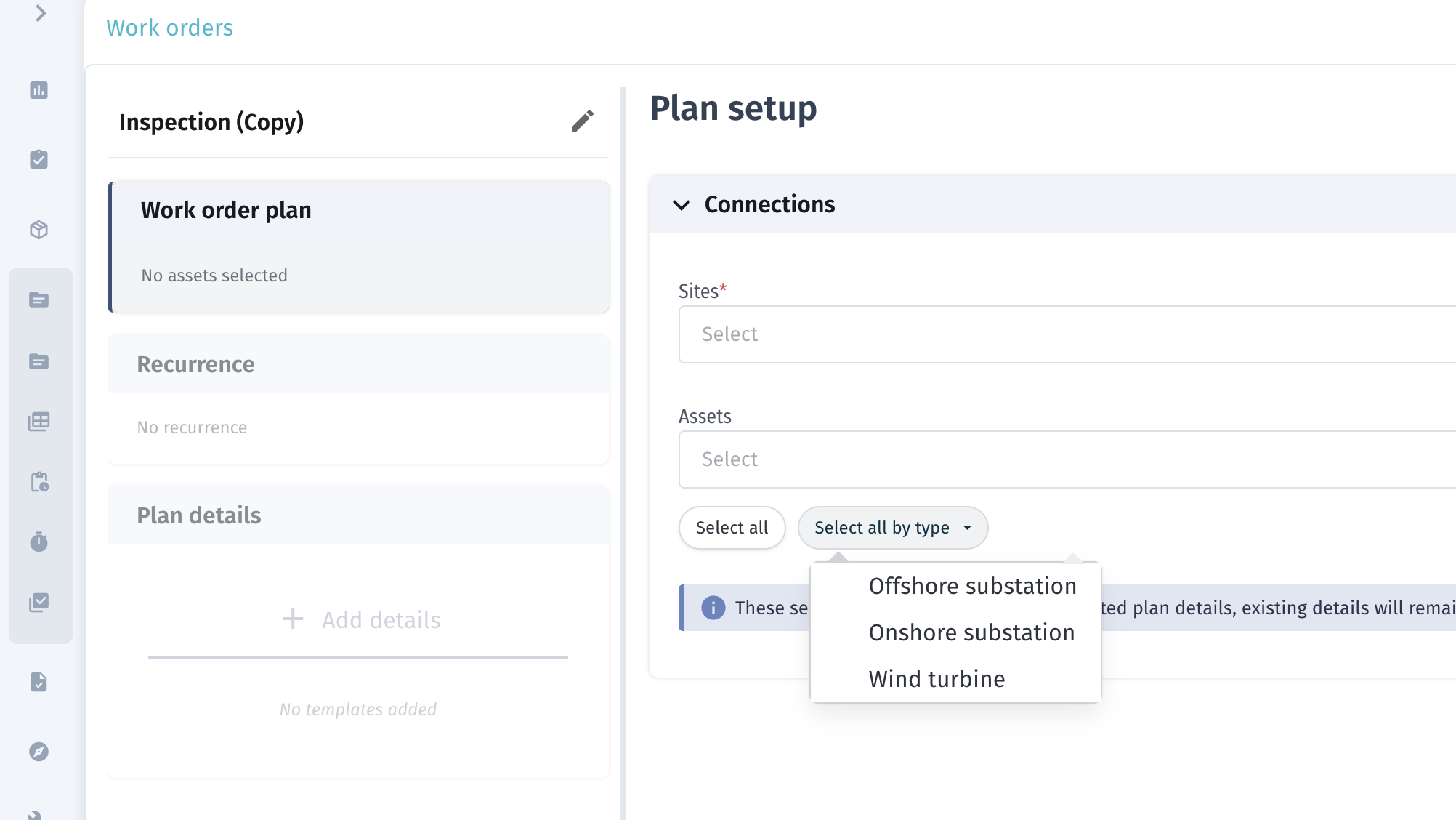
Select all by type in plan details and work order templates
What's new A Select All by Type dropdown has been added to plan details and work order templates in work plans, making it faster to bulk-select items of the same type.
Work package names no longer show "Ungrouped"
What's new Work packages that were previously labelled "Ungrouped" in their name now display without this prefix, giving a cleaner view in work plan details.
Mandatory toggle for defects in work packages
What's new A mandatory toggle has been added to defects within work packages, allowing teams to mark specific defects as mandatory requirements for the work package.
Defects
Downtime hours field
What's new When a defect is marked as Causing Downtime, a new Downtime Hours field is now shown. The field is automatically cleared if the downtime toggle is switched off.
Closed date
What's new Defects now record a Closed Date automatically when transitioned to Closed or Closed – No Action Taken. The closed date is displayed as a read-only field in the defect details and as a sortable column in the defect list. The date is cleared if the defect is re-opened.
Defect CSV export
What's new A new Export CSV button is available on the defects list. The export runs as a background job and includes all defect fields, with HTML stripped from description and remark fields.
Inventory
Inventory grouping
What's new The inventory overview now organises items by inventory group. Each inventory name (catalogue entry) can belong to a group, and the overview list displays groups as expandable rows.
Where to find it Groups can be created and managed under Account Settings > Inventory > Inventory Groups.
Items with no assigned group appear under a system group labelled Unassigned.
Condition field on inventory items
What's new A Condition field is now available on all equipment inventory items. The available values are:
- New
- Refurbished
- Damaged
- Scrap
The condition is shown in the inventory item modal and as a configurable column in the inventory table. It is also included in CSV imports using the field name Condition status.
Personnel
Column configuration on personnel list
What's new The personnel list now supports column configuration, allowing users to show, hide, and reorder columns to match their workflow.
Notifications
More information in notifications
What's new Notifications now include additional context — specifically assets and status — giving recipients more detail without needing to open the related record.
Reports
End time updated from 23:59 to 00:00
What's new Report end times now use 00:00 (midnight of the following day) instead of 23:59, providing more precise time boundaries for reporting periods.
Timeline
🔄 Location visibility on the timeline
What's new Location information is now surfaced on the timeline view.
Permits
🔄 Warnings and validations (Permits+)
What's new Additional warnings and validations have been added to the Permits+ module.
Site Management
Site CSV export
What's new A new Export CSV option is available on the site list, allowing users to download site data as a CSV file.