
These features come directly from feedback teams like yours have shared with us, and they're already in delivery or ready for release in the weeks ahead.
Home & Daily Workflow
Home Page
Users can now land on a personalized Home page. The page brings together items that need attention, today's assigned activities, rotation context, and weather in one place. A widget picker lets each user turn rotation context, weather, and shortcuts on or off, so the layout matches how they actually work.
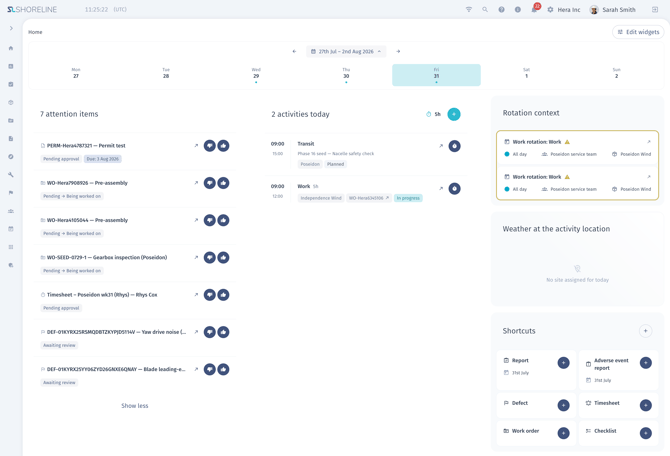
Why it matters: removes the multi-module hunt that currently happens every time someone signs in, cutting the time between logging in and taking the day's first action.
Site Access & Permissions
Site Induction
Site managers can invite external people to a site by email through a secure, one-time link — no shared or emailed passwords involved. Recipients set up their own account and complete their personnel profile before being routed through an approval step. Existing personnel already on the platform can be added to a site induction individually or in bulk from the site list, and approvers can approve or reject requests with a required reason for any rejection.

Why it matters: gives site managers a controlled way to onboard contractors and crew at scale, without manually entering their data or relying on a security-weak password-sharing process.
Streamlined Cross-Project Access Management
Administrators managing users across many separate projects will get a redesigned, user-centric way to assign access — adding only the projects relevant to a person and setting their permission level for each, instead of working through a large grid of every user against every project.
Why it matters: makes it faster and less error-prone to set up the right access for people who work across multiple projects, especially when onboarding several people at once.
Bulk Work Package Access Sharing
Administrators can select multiple work packages at once and grant one or more users access to all of them in a single action, instead of repeating the same sharing step for every work package individually.
Why it matters: turns a repetitive manual task into one step, saving time when a new team member or contractor needs visibility across a large, multi-package project.
Fine-Grained Personnel Data Permissions
Personnel profiles will support more precise access controls, so roles can be granted access to specific tabs and fields — like work schedule, rotations, or contracts — independently of one another, and sensitive attachments and custom fields can be restricted to a smaller group without hiding the rest of the record.
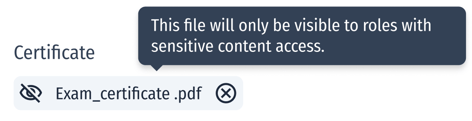
Why it matters: lets teams limit who can see sensitive personnel information while still letting others confirm the basics they need, like whether a certification or contract is current.
Work Orders
Improved Work Order Search
Work Order search, used when linking a Work Order to an Activity, is being improved to match on asset and name in addition to Work Order ID, with better support for non-Latin characters.
Why it matters: makes it faster to find the right Work Order when linking it to an activity, especially for teams searching in languages other than English.
Reporting & Analytics
Custom Free-Text Columns on Report Templates
Report templates can now include one or more custom free-text fields, added on demand to any section such as Completed Activities or Adverse & Deviations. Each custom field appears as its own column when a report is generated from that template.
Why it matters: lets report authors capture a project-specific data point without waiting on a platform change or requesting a custom template from support.
Faster, More Flexible Reports
The Report is being rebuilt for speed and flexibility, replacing slow full-page reloads on simple edits with fast in-line editing throughout. The date filter expands from a single day to a configurable date range, and PDF exports get a cleaner, more polished layout.
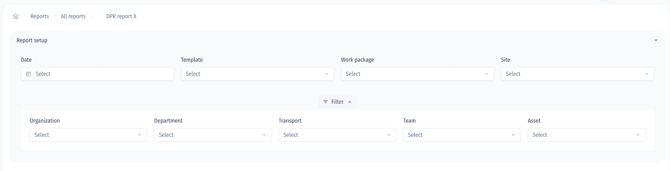
Why it matters: removes a loading delay that currently disrupts day-to-day maintenance work, and lets teams review trends across more than one day at a time.
Scenario Analysis
Extended Simulation Time Horizons
Simulation cases will support much longer time horizons, letting users model a wind farm's performance across its full operational lifetime in a single run.
Why it matters: supports long-range financial and operations planning without needing to stitch together multiple shorter simulation runs.
Questions about any of these? Visit docs.shorelinewind.com or reach out to your Shoreline contact.