
Work package sharing controls who can see a Work package and the information linked to it.
Use sharing when a Work package contains project-specific or sensitive information that should only be visible to selected users. Instead of managing visibility separately for each linked record, access is managed from the Work package.
Normally, users can only see Work packages they have access to. A user gets access when they are added to the Work package sharing list, or when they use a broader visibility setting such as Allow to view all shared objects.
Table of Contents
- What Work package sharing solves
- Where to find Work package sharing
- How Work package access works
- Add users to a Work package
- Add all users to a Work package
- Give a user admin rights
- Remove users from a Work package
- Use Allow to view all shared objects
- Available actions and views
- Prerequisites and limitations
- Troubleshooting
What Work package sharing solves
Work package sharing helps control visibility when several teams, projects, or scopes exist in the same account.
It is useful when:
- Users should only see the Work packages relevant to their work.
- Project-specific information should not be visible to everyone.
- A project team needs access to linked activities, work orders, assets, inventory, personnel, logistics, or calendar information.
- A smaller group needs to manage access for a specific Work package.
- Some users need broad visibility across many Work packages without being added to each one manually.
The intention is to make access easier to manage at project or Work package level, while still allowing selected users to have broader oversight when needed.
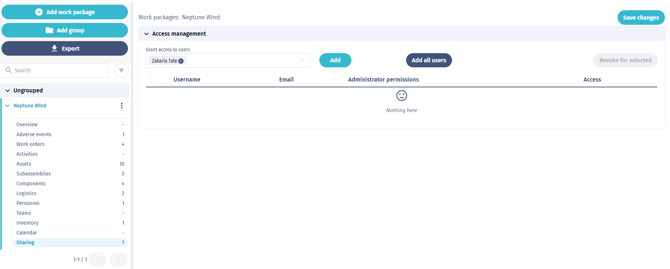
Where to find Work package sharing
- Go to Work packages.
- Open the relevant Work package.
- Select Sharing from the Work package menu.
The Sharing page is only available when you are online.
How Work package access works
Work package sharing works together with normal user permissions.
| Setting or access type | What it does |
|---|---|
| Work package sharing list | Gives selected users access to a specific Work package. |
| Work package admin rights | Allows selected users to manage sharing for that specific Work package. |
| Work package sharing permission |
Allows users to manage Work package sharing more broadly, depending on their role permissions.
|
| Allow to view all shared objects | Allows the user to view shared objects across Work packages without being added to each Work package individually. |
| Allow super admin to view all shared objects | Super-admin version of the same broad visibility mechanism. |
| Super admin access | Gives broad administration and visibility, depending on configuration. |

Being added to a Work package does not automatically give a user every possible action in every module. For example, a user may be able to see that a Work package exists, but still need the correct Work orders, Activities, Assets, Personnel, Inventory, or Logistics permissions to open or manage linked records.
Add users to a Work package
Use this when only specific users should access the Work package.
- Open the Work package.
- Select Sharing.
- Search for the user by name.
- Select one or more users.
- Click Add.
- Review the pending changes.
- Optional: turn on Admin rights for users who should manage sharing for this Work package.
- Click Save changes.
After saving, the selected users can see the Work package and the linked information they are permitted to access.
Add all users to a Work package
Use this when all users with login access in the account should have access to the Work package.
- Open the Work package.
- Select Sharing.
- Click Add all users.
- Review the pending changes.
- Click Save changes.
Use this carefully if the Work package contains sensitive information. This action can make the Work package visible to many users at once.
Give a user admin rights
Admin rights allow a user to manage sharing for that specific Work package.
- Open the Work package.
- Select Sharing.
- Find the user in the sharing list.
- Turn on Admin rights for that user.
- Click Save changes.
A Work package must always have at least one user with admin rights. If your changes would remove the last admin, the changes cannot be saved.

Remove users from a Work package
Removing a user from the sharing list removes their access to the Work package, unless they have broader visibility through Allow to view all shared objects or super admin access.
- Open the Work package.
- Select Sharing.
- Find the user in the sharing list.
- Click the remove icon for that user.
- Click Save changes.
To remove several users at once:
- Select the users in the sharing list.
- Click Revoke.
- Click Save changes.
Users with admin rights cannot be selected for bulk removal. First remove their admin rights, while making sure at least one Work package admin remains.
Use Allow to view all shared objects
Allow to view all shared objects is a user setting that gives broader visibility across shared information.
Normally, users only see shared objects that are connected to Work packages they have access to. This means the user must be added to the relevant Work package sharing list.
When Allow to view all shared objects is enabled, the user can view shared objects across Work packages without being added to each Work package individually.
This setting was added to support users who need an overview across many Work packages, such as planners, coordinators, project leads, or administrators. It avoids the need to manually add the same user to every Work package just so they can see shared information.
This setting helps solve cases where:
- A user needs to review work across many Work packages.
- A user supports several projects or scopes at the same time.
- A user should not be blocked by individual Work package sharing lists.
- Teams want to avoid maintaining the same access repeatedly across many Work packages.
This setting:
- Allows broader visibility of shared objects.
- Does not automatically give edit rights.
- Does not automatically give permission to manage Work package sharing.
- Does not replace normal module permissions.
- Should only be enabled for users who need broad visibility.
Users can enable or disable this from their own User settings, if the option is available for their account.
To enable or disable it:
- Open User settings.
- Go to the General tab.
- Select or clear Allow to view all shared objects.
- Click Save.
Super admins may also see Allow super admin to view all shared objects. This is the super-admin version of the same broad visibility mechanism.
Available actions and views
The Sharing page shows the users who currently have access to the Work package.
The list includes:
- Name
- Admin rights
- Access removal action
Available actions depend on your permissions:
| Action | Who can do it |
|---|---|
| View the sharing list | Users who can open the Work package. |
| Add selected users | Users with the required Work package update and sharing rights, or Work package admins. |
| Add all users | Users with the required Work package update and sharing rights, or Work package admins. |
| Change admin rights | Users with the required Work package update and sharing rights, or Work package admins. |
| Remove users | Users with the required Work package update and sharing rights, or Work package admins. |
| Save sharing changes | Users with the required Work package update and sharing rights. |
Prerequisites and limitations
- The Work packages feature must be enabled for the account.
- Users need access to Work packages to open the Work packages area.
- Users need read access to Work packages to view Work package details.
- Users need the required Work package update and sharing rights to save sharing changes.
- The Sharing page is not available offline.
- Work package sharing applies to information linked to a Work package.
- Information not linked to a Work package remains visible based on normal module permissions.
- Access applies to the Work package as a whole. You cannot share only part of a Work package with a user.
- A Work package must always have at least one admin.
- Changes are not applied until you click Save changes.
- Add all users adds available users with login access; it should be used carefully.
Troubleshooting
I cannot see a Work package
You may not be on the Work package sharing list. Ask a Work package admin or customer admin to add you.
If you need broad visibility, open User settings and check whether Allow to view all shared objects is available and enabled.
I can see the Work package but not a linked item
You may not have the required permission for that module. For example, you may need access to Work orders, Activities, Assets, Personnel, Inventory, or another related area.
I cannot edit the sharing list
You may not have the required sharing rights, Work package update permission, or admin rights on that Work package. Ask a Work package admin or customer admin to update your access.
I do not see Allow to view all shared objects
The option may not be available for your account configuration or user type. If you expected to see it, contact your customer admin or Shoreline support.
I see both Allow super admin to view all shared objects and Allow to view all shared objects
This can happen for super admins. Both options are related to the same broad visibility mechanism. The super admin option is shown specifically for super admin users.
The Add button is disabled
Select at least one user before clicking Add.
The Add all users button is disabled
All available users may already have access to the Work package.
I cannot remove a user with admin rights
Users with admin rights cannot be removed in bulk. Remove their admin rights first, while making sure at least one admin remains.
I cannot save my changes
Check that at least one user still has admin rights on the Work package. Also confirm that you have permission to update Work packages and manage sharing.
A user cannot find an activity or work order
Check whether the activity or work order is linked to a Work package. If it is, make sure the user has access to that Work package or has Allow to view all shared objects enabled. Also check that the user has the required permission for that module.
The Sharing page is unavailable while offline
Reconnect and open the Sharing page again. Work package sharing must be managed online.