
All-New Defect Management Interface
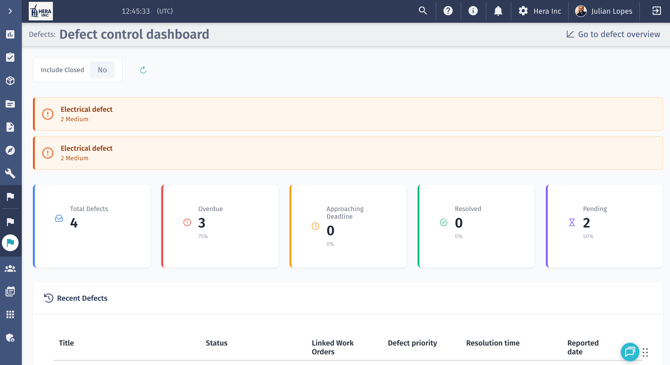
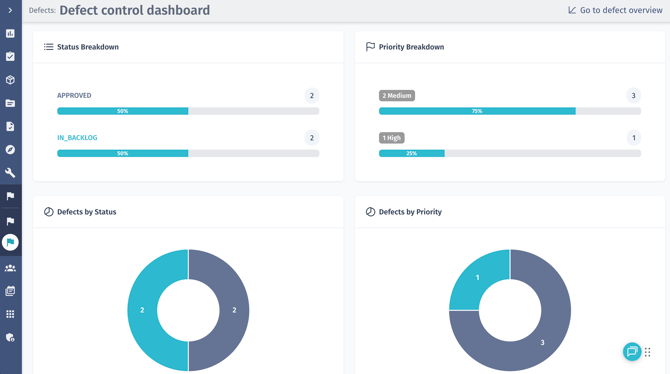
Defect management has been refreshed with a more actionable interface, surfacing critical information more clearly and making analysis more intuitive. The new Defect Control Dashboard delivers an at-a-glance view of performance, with summary cards highlighting key metrics such as total defects, overdue items, approaching deadlines, resolved cases, and pending actions. Clear breakdowns by status, priority, and category, combined with improved tables and visual charts, help teams quickly identify trends, spot bottlenecks, and prioritize action with greater confidence.
Introducing “No Action Required” for Defects
As defect programs mature, not every approved defect requires corrective action. Some represent acceptable risk, duplicates, or issues already resolved outside the system. Clear visibility into these decisions is essential to maintaining both audit integrity and clean planning workflows.
What’s New
A new defect status, No Action Required, is now available for approved defects where no action has been taken. Approved defects with no associated action can transition to this status, explicitly marking them as logged but not requiring follow-up work.
- Prevents the defect from driving Work Order planning
- Removes it from views that indicate action is required
- Preserves the defect record for audit and traceability
Why It Matters
Clear differentiation between actionable and non-actionable defects is essential for effective planning and governance. This update enables intentional closure while preserving audit traceability, reducing planning noise and strengthening lifecycle transparency.
Accurate Defect to Work Order Status Flow
Accurate lifecycle tracking relies on status changes that reflect real operational progress. When a defect transitions to a Work Order, it should clearly signal that execution is underway, and that corrective action has been formally committed.
What’s New
The defect status now updates to reflect release only after the Work Order is successfully saved. Simply initiating the creation flow no longer changes the status, ensuring it updates only when the record has been formally created, and execution is confirmed.
Why It Matters
By aligning status changes with confirmed execution, this update keeps defect tracking accurate and meaningful. Teams can rely on defect records to reflect real progress, reducing unnecessary follow-up, and enabling clearer oversight and more dependable reporting.
Flexible Work Order Creation from Defects
Operational issues often share the same root cause or corrective action. Managing them efficiently requires flexibility in how defects and Work Orders are connected.
What’s New
You can now:
- Create one or many work orders from a single defect.
- Create a single defect and link to one or many existing work orders.
- Link one or many approved defects to one or many work orders.
Why It Matters
Sometimes a single defect requires its own corrective action. Other times, multiple related defects stem from the same root cause and can be resolved through one consolidated work order. In some cases, a newly identified defect may need to be linked across existing or multiple work orders to reflect broader remediation efforts.
Improved Work Order Context in Defects
Clear asset and Work Order context is critical when logging and managing defects. Greater visibility reduces errors and accelerates investigation and resolution workflows.
What’s New
Work Order visibility and selection within defects have been enhanced:
- Work Order dropdown is now filtered by the selected entity in the hierarchy picker
- Entity ID is displayed in the asset hierarchy picker for clearer identification
- Defect records include a clickable link to the associated Work Order
- Work Order dropdown displays extra details, including ID and asset or location.
In addition, the Defect List now includes two new columns:
- Linked Work Order
- Linked Checklist
Both display the object reference, including name and ID, and are fully clickable for direct navigation.
Why It Matters
Enhanced context improves selection accuracy, strengthens traceability, and accelerates investigations. Clearer links between defects, assets, and work orders provide faster insight into ownership and corrective actions.
Feedback & Support
If you have questions, encounter any issues, or would like to share feedback, please contact our Support team or submit a ticket directly from the platform. We’re proud to support your work and look forward to continuing to work together.