
Recurring Work Plans
Recurring work planning has historically required planners to manually create repeat work orders; a time-intensive process prone to oversight. This update automates that cadence by generating work orders based on configurable rules and templates.
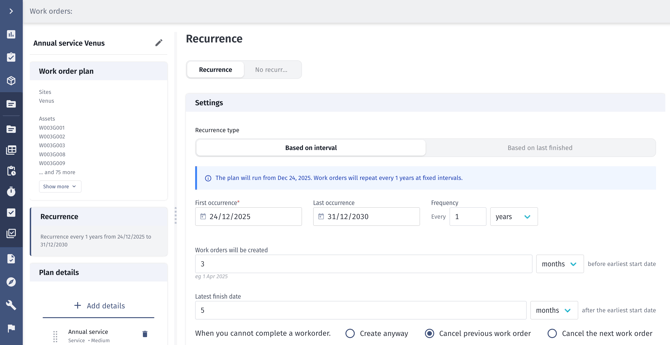
What’s New
- Automatically generate work orders based on the time since the last completed work order or fixed intervals (days, weeks, months, or years)
- Define when plans start and end using specific dates, a set number of recurrences, or no end date
- Control how early work orders are created ahead of their earliest start date
- Assign one or more assets, including relevant subassemblies from the asset hierarchy
- Configure work order templates with skills, personnel, inventory, bill of materials (BOM), checklists, logistics, and other work order data
- Trigger the creation of upcoming work orders immediately without changing their earliest start dates
- Group plans across multiple assets while still tracking individual asset-level plans
- Schedule planned dates later using the Gantt chart and timeline after work orders are created
Why It Matters
Recurring Work Order Plans shift recurring work from manual to proactive, with tangible benefits:
- Automated scheduling: reduces repetitive planner tasks
- Increased consistency: standardised recurrence rules and templates ensure predictable cadence
- Better uptime: reduces reactive maintenance and unexpected breakdowns
- Scalable planning: supports multi-asset operations with grouped plans and asset/subassembly level control
Learn more: access the detailed recurring Work Plans user guide here. We’ve also published a blog post that explores how they work in practice. You can read it here.
Site Overview Improvements
Understanding site progress across assets has been challenging on large or complex projects. This update gives planners, coordinators, and stakeholders a clearer, more intuitive view of work status, straight from the platform.
.webp?width=670&height=340&name=Screenshot%202025-12-04%20at%2015.19.51%20(1).webp)
What’s New
- More compact and readable visual indicators showing progress across assets
- Improved map-based views to visualise work in the context of the site layout
- Clear summaries of planned, in-progress, and completed work
- Better visibility into overall site status at a glance across complex projects
Why It Matters
These improvements make it easier to understand site status, identify issues, and communicate progress without relying on external tools or manual reporting. Clearer visuals, smarter map behaviour, and richer summaries help teams and stakeholders make faster, more confident decisions directly from the Site Overview.
Content Type Visualisation and Map Views
- Updated map markers with new icons and visual styles aligned with the latest designs
- Introduced dedicated map views: Milestones, Work Orders, Permits, and Personnel
- Improved tooltips across assets and cables to surface key information on hover
Side Panel and Dashboard Enhancements
- Introduced new side panel content when no asset is selected
- Restyled the map areas section to better align with updated designs
- Added the ability to toggle between entire map and current map view data
Map Legends and Zoom Behaviour
- Simplified map legends, now shown only in milestone and permit views
- Legend colours align with milestone progress and permit status
- Improved zoom behaviour with smooth transitions between site-level markers, clustered asset views and Individual asset markers
- Cluster markers display asset counts and milestone progress where applicable
- Tooltips and badges are hidden at cluster level for clarity
Further Enhancements
- Added the ability to download personnel and location data directly from the Site Overview
- Refined the milestone view with a wider sidebar, asset-based filtering, custom date ranges, and extended time comparisons
- Added support for counting work orders across sequences, aligned with map scope and filters
- Introduced save and load functionality for Site Overview filters, including URL-based filter loading for bookmarking
Learn more: see the full walkthrough in the user guide here.
Feedback and Support
If you have questions or feedback on these new features, please reach out to our support team or submit a ticket directly through the platform. Thank you for continuing to grow with Shoreline.