
Grouped Gantt Chart
As project schedules grow more complex, understanding how work overlaps across shared assets and work plans becomes critical to effective coordination. A more structured view of operations and workload supports better planning across projects.
What’s New
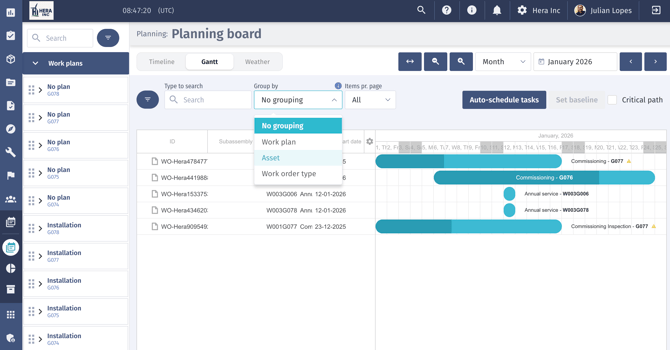
The Gantt chart now supports grouping operations by Asset and Work Plan, while retaining the existing ungrouped view.
- View concurrent operations involving the same asset or linked work plans
- Switch easily between grouped and traditional views for flexible planning
- Quickly assess workload clustering and resolve schedule contention
Why It Matters
Grouping operations by asset and work plan makes conflicts easier to identify and improves visibility into concurrent work. This helps teams better understand workload distribution, coordinate parallel activities, and plan more efficiently as operational complexity increases.
Work Order Improvements
To reduce manual effort and improve data quality in day-to-day planning, enhancements have been made to how work orders are created, validated, and managed.
What’s New
- Duplicate work order detection by date
The system now checks for duplicate work orders based on overlapping or matching dates, helping prevent accidental duplication and improving data integrity. - Bulk work order creation across multiple assets
Create identical work orders for multiple assets in a single action using a new multi-select asset picker. Each work order is created independently and inherits the same details, including descriptions, dates, work packages, and documents. - Improved work order start date behavior
When all completed activities are removed from a work order, the start date now clears and becomes editable again, ensuring dates accurately reflect the current plan.
Why It Matters
Together, these improvements simplify work order management, reduce the risk of data inaccuracies, and ensure schedules more accurately reflect how work is planned and executed. Teams can plan and update work orders with greater confidence, spend less time on manual administration, and maintain reliable schedules as operations scale.
Permission to Download System Data
A new export permission governs who can download system data (across all objects and reports), addressing governance and compliance needs.
What’s New
- Only users with the dedicated role can export datasets
- Applies consistently across all export types
Why It Matters
This strengthens data security and governance by ensuring exports are restricted to authorized roles, supporting compliance and audit readiness across the platform.
Pay Configuration and Payroll Improvements
New enhancements on how pay rules are configured, calculated, and presented, giving teams greater flexibility and accuracy in how overtime and capped rates are applied.
What’s New
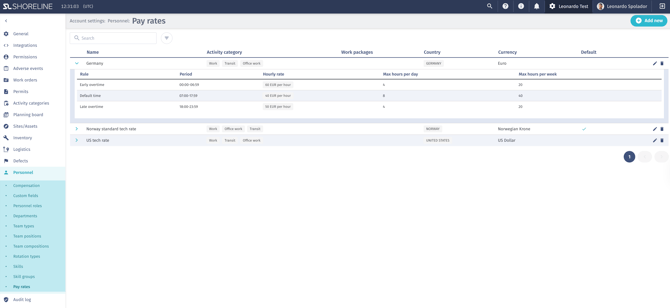
- Overtime payrate rules can now be configured based on total hours worked, with support for multiple escalating thresholds, alongside existing time-of-day rules
- The payroll engine applies hours-worked overtime rules incrementally during paycheck calculation
- Paycheck views clearly display overtime rates and how they are applied
- Contract files are automatically renamed on upload for clearer identification and traceability
Why It Matters
These updates ensure payroll calculations more accurately reflect real working patterns and agreed pay structures. By supporting hours-based overtime thresholds and clearer pay visibility, teams gain greater confidence in payroll accuracy, reduce manual checks, and better align pay outcomes with contractual terms across different work patterns.
Contract File Naming
Contract file handling has been improved so that when a contract or contract template is replaced, the stored file name now updates to match the newly uploaded file. This ensures file names remain accurate and consistent, reducing confusion and improving traceability when managing and updating contracts.
Feedback & Support
If you have questions, encounter any issues, or would like to share feedback, please contact our Support team or submit a ticket directly from the platform. We’re proud to support your work and look forward to continuing to work together.